Italian versionEnglish version

ClassX CGSeries

The revolutionary Suite for graphics compositing and dynamic titling.

Download the brochure of our products (english).


MoreCG MoreCG is a complete program for the creation of titling and digital video effects in real time with text, images, video clips and animations.

Release v4.0
update now!

CASTALIACG CastaliaCG is the first, revolutionary software featuring realtime broadcast character-level effects and hierarchical vector/bitmap animation.

Release v4.0
update now!

CGPlayout CGPlayout is an advanced playout software for the creation and the execution of dynamic playlists.

Release v4.0
update now!

MoreCG


MoreCG is a complete program for the creation of titles and digital video effects in real time with text, images, video clips and animations. Its intuitive user interface combines power and ease of use into a high performance system for the creation of content-rich, state of the art, broadcast-quality dynamic titling.
MoreCG includes a powerful graphics engine to achieve timeline-based 2D/3D effects on any kind of object or media file. Thanks to its integrated functions, users have the freedom to create graphics contents like texts, shapes, images, clips and enhance their look with the power of a complete set of dynamic filters like border, extrusion, shadow, outline, bevel, etc.
MoreCG can also apply static and dynamic textures to any object. With MoreCG there's not need to access expensive external software in order to create your very own attractive graphics.
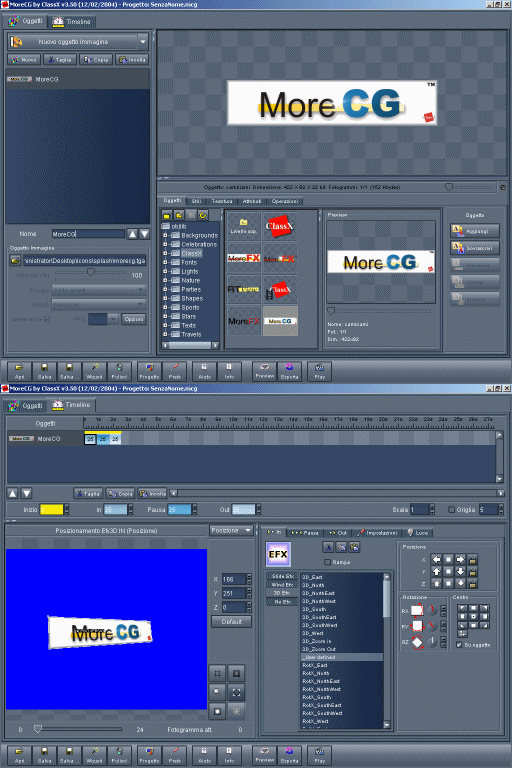
Interfraccia MoreCG

· 6 types of objects: Text, Shape, Image, QTVideo, AVIVideo, BitmapFont.
· Graphic attributes engine integrated.
· 2D and 3D positioning environment.
· Support of static and animated textures.
· Live titles templates library including auto-compositing Wizard.
· Internal library of objects ready to use.
· Environmental reflections.
· Wide library of customizable effects: Slide, Wind, 3D.

MoreCG combines flexibility and reliability into a one, unique product. With MoreCG you can build a simple scroll or a complex intro: you can always count on the thousands of customizable effects, the ready-to-use presets and the wide range of tools.
Editing projects with MoreCG is easy: everything you do, every effect, every single modification is rendered and displayed in realtime. Even more with the built-in RTView you can immediately preview your graphics and projects on your PAL/NTSC monitor.

System requirements

Minimum
. CPU Intel® Pentium® III @ 1Ghz or CPU AMD® Athlon®
. RAM 512 MB or more of physical RAM
. OS: Microsoft Windows 2000® Professional SP 3 (or later) or Windows® XP SP 1 (or later)
. Gfx board: Matrox Parhelia, Millennium P-Series, Millennium G550 or G450.

Recommended
. CPU Intel® Pentium® IV @ 3.0Ghz or CPU AMD® Athlon® XP 3.0Ghz or higher.
. RAM 1 GB or more of physical RAM
. OS: Microsoft Windows 2000® Professional SP 3 (or later) or Windows® XP SP 1 (or later)
. Gfx board: Matrox Parhelia, Millennium P-Series, Millennium G550 or G450.


For more information please read the
MoreCG details.

CASTALIACG


CASTALIACG is a complete program for the creation of timeline-based titles and character-level text effects in real time.
CASTALIACG creates dynamic tiling with text, images, video clips and animations. Its intuitive user interface combines power and ease of use into a high performance system for the creation of content-rich, modern state of the art, broadcast-quality dynamic titling.
Vector graphics is very important when high-quality matters. CASTALIACG's engine handles both bitmap and vector graphics by keeping them in their native format. With CASTALIACG you can easily create hierarchical animations and move single characters or even object groups over a given path.
Thanks to CASTALIACG incredible flexibility and customization possibility, Users can manage at the best their effects. These can be composed and applied to any object or group. Special-purpose waveform editors help you to create your very own effects in few seconds, but you can always count on the close-to-infinite amazing effect presets.

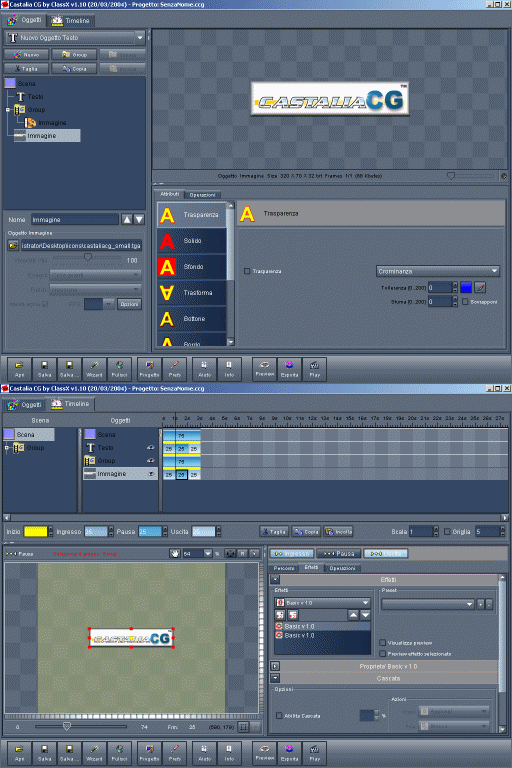
Interfraccia CastaliaCG

· Live titling projects library including auto-compositing Wizard.
· Wide library of character-level customisable effects.
· Realistic shadows.
· Broadcast quality vector graphic engine.
· 4 types of objects: Text, Shape, Image, Group.
· Graphic attributes engine integrated.
· Objects moving on a customizable path.
· Hierarchical animations support.

Thanks to its integrated functions users have the freedom to create graphics contents like texts, shapes, images, clips and enhance their look with the power of a complete set of dynamic filters like border, extrusion, shadow, outline, bevel, etc.
CASTALIACG combines flexibility and reliability into a one, unique product. Editing projects with CASTALIACG is easy: everything you do, every operation, every effect, every single modification is rendered and displayed in realtime. Even more with the built-in RTView you can immediately preview your graphics and projects on your PAL/NTSC monitor.


System requirements

Minimum
. CPU Intel® Pentium® IV at 2.4Ghz or CPU AMD® Athlon® equivalent
. RAM 1 GB or more of physical RAM
. OS: Microsoft Windows 2000® Professional SP 3 (or later) or Windows® XP SP 1 (or later).
. Gfx board: Matrox Parhelia, Millennium P-Series, Millennium G550 or G450.

Suggested
. CPU Intel® Pentium® IV at 3.0Ghz or CPU AMD® Athlon® XP 3.0Ghz or higher
. RAM 1 GB or more of physical RAM
. OS: Microsoft Windows 2000® Professional SP 3 (or later) or Windows® XP SP 1 (or later).
. Gfx board: Matrox Parhelia, Millennium P-Series, Millennium G550 or G450.


For more information please read the
CASTALIACG details.

CGPlayout


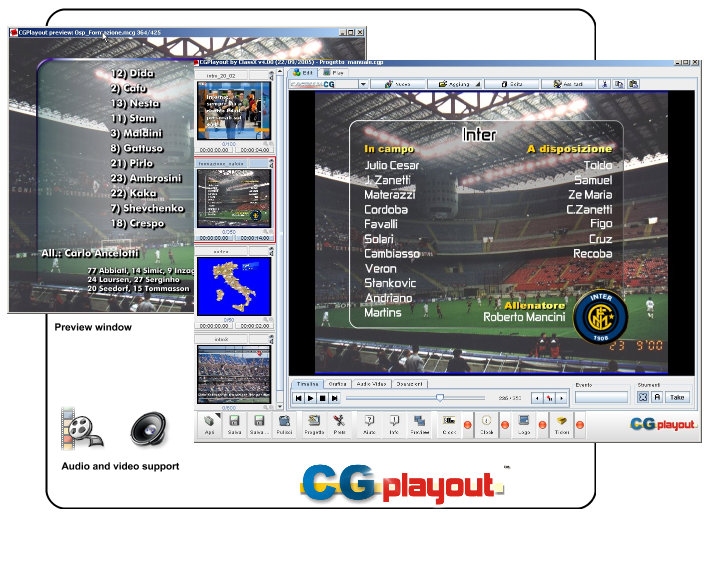
CGPlayout is an advanced playout software for the creation and the execution of dynamic playlists. CGPlayout has been developed for live broadcast applications and it emerges for the flexibility and the power of its features.
CGPlayout is the first graphical playout solution capable of playing and editing dynamic contents of the playlist at the same time using one single computer.

The editing of the playlist is very simple and every operator will feel in full comfort with the power and the ease of use of the interface. The playout list can include any number of MoreCG and CastaliaCG projects.
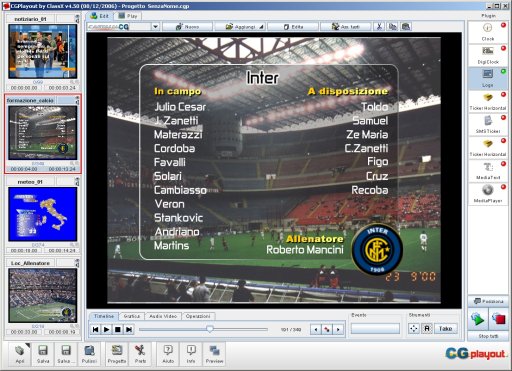
The project icons are visible in the main window and they can be scrubbed with the mouse in order to get an animated preview of their contents. Projects can be edited with just a double-click on the icon.

. Editing, creation, handling of multiple playlists.
. Keyboard (user defined keys) or mouse driven project playout.
. Automatic project key assignment.
. Direct support for MoreCG and CastaliaCG.
. Arbitrary pause management support.
. Dynamic playing speed control.
. Full RTView support.
. Export to video in real time.
. Instant animated random-access project preview either fullscreen or into the project icon.
. Animated projec preview through dual-monitor.
. Live or automatic playout.
. Possibility to modify projects contents during the playout.
. "One-touch" project recall.
. Anti-panic key.
. Audio clips support.
. Data source support as Database, plain text, CSV and XLS files.
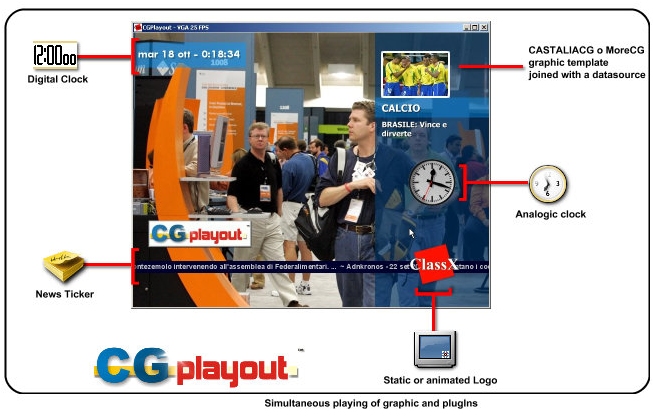
. Integrated plugIns as Analogic and Digital Clock, News-Ticker, static and animated Logo.
. Support for SGL hardware acceleration.


CGPlayout
 

CGPlayout 2.0

CGPlayout: playout on tvGet the full control of Audio, video and graphical contents in real time with CGPlayout. With the power and the ease of use of its interface, CGPlayout gives more flexibility to the management of your direction. The high performance of its graphics engine allows to get high-end broadcast-quality results.
CGPlayout: audio and videoCGPlayout gives you the total control of the output: you can dinamically modify ON AIR graphical contents, manage data sources, simultaneously execute audio, video and graphics with a simple key press.

CGPlayout is the real innovation.

Complete playlist control
The playlist editor allows to add, remove, modify, reorder video, audio and graphics without errors in short or no time.

Scrub preview
Click, drag and release over the playlist icons and you can have a real time preview of any project.

Advanced preview
CGPlayout integrates an advanced preview system that uses the dual monitor output of the graphic cards to give to you a real time preview frame by frame of any project while playing another one. This feature is very important and gives you the complete control over the playlist objects and doesn't require any particular hardware.

CGPlayout: onairOn Air Editing
In Live productions changes are dynamic. And you must be ready to modify the contents of your production in no time. CGPlayout combines advanced functionality with maximum efficiency and flexibility, allowing you to change any graphics content even while you're on air.


CGPlayout: automatic play
Automatic play
The "Automatic" mode is designed to automate the execution of playlists. CGPlayout allows to set the playing order and the looping cicles of each playlist elements. Then, all you have to do is to start the execution of the playlist and let it work for you.


CGPlayout: play from keyboard
Play Live
With the "Live" mode the operator has the complete control over the playlist. He can modify any of the projects, assign keyboard shortcuts and execute the projects with a simple keypress .

DataSource™
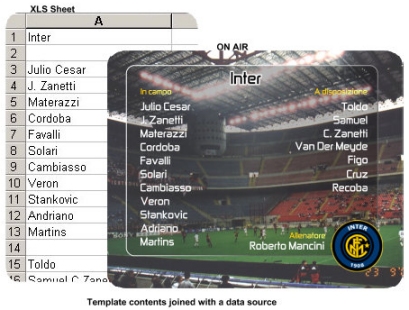
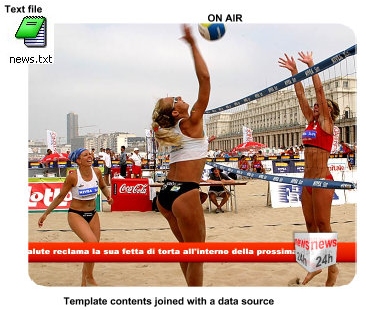
CGPlayout joins the contens of any MoreCG and CASTALIACG project with external data sources. This feature allows to create graphics templates that can update their contents in realtime with data coming from external sources. That's why with CGPlayout it is very quick and easy to create newstickers, sport events titles, charts and any graphics project that renders dynamic data.


Download the CGSuite v4 brochure (pdf version).

CGPlayout: playing time control

Playing time control
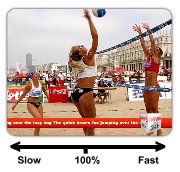
All MoreCG and CASTALIACG projects are based on a timeline. This means that they have a playing time defined from the author of the project. In live prodution it could be necessary to change the project playing time dynamically. That's why CGPlayout allows to change the project playing time whenever you want by modifying the execution speed even when the project is playing.


CGPlayout: pause management

Arbitrary pause management
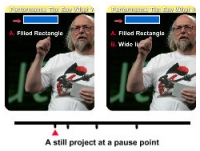
CGPlayout allows to set any number of pause points into any graphics project. This allows to present data, titles, etc. with maximum flexibility.


CGPlayout: media support

Multi-Media
CGPlayout supports AVI video files as Matrox* DV and MPEG2, and WAV audio files that can be played simultaneously in synch with graphics. (* only for DigiSuite cards).


CGPlayout: join with data sourcesCGPlayout: join with data sources

Integrated PlugIns
CGPlayout combines graphics, audio and video with advanced plugIns so you can generate compelling layouts quickly and easly. CGPlayout comes complete with four different customizable plugins: LiveLogo, LiveTicker, LiveClock and LiveDigiClock. And of course they can run simultaneously with any graphics, video, audio.

CGPlayout: integrated plugins


System requirements

Minimum
. CPU Intel® Pentium® IV at 3.0Ghz or CPU AMD® Athlon® equivalent
. RAM 1 GB or more of physical RAM
. OS: Microsoft Windows 2000® Professional SP 3 (or later) or Windows® XP SP 1 (or later).
. Gfx board: Matrox Parhelia, Millennium P-Series, Millennium G550 or G450.

Suggested
. CPU Intel® Pentium® IV at 3.2Ghz or CPU AMD® Athlon® XP 3.2Ghz or higher
. RAM 1 GB or more of physical RAM
. OS: Microsoft Windows 2000® Professional SP 3 (or later) or Windows® XP SP 1 (or later).
. Gfx board: NVidia or ATI AGP or PCI Express (recommended).

Hardware

The ClassX CGSeries® products have been developed for the Matrox Digisuite and CG2000 board sets. 3G Videogroup is the exclusive Distributor of ClassX CGSeries products.

 

Any and all trademarks used belong to their respective owners. Please read our Legal Notes.
This site is optimized for at least 1024x768 resolution (hi-color) viewing with a browser that supports style sheets.